
Studio tools / Buying guide
5 paper cutters for a cleaner cut
TLDR
The Dahle 508 is my pick for trimming single sheets and small batches. Choose the CARL DC-210N for larger paper stacks, and check capacity against your actual paper.
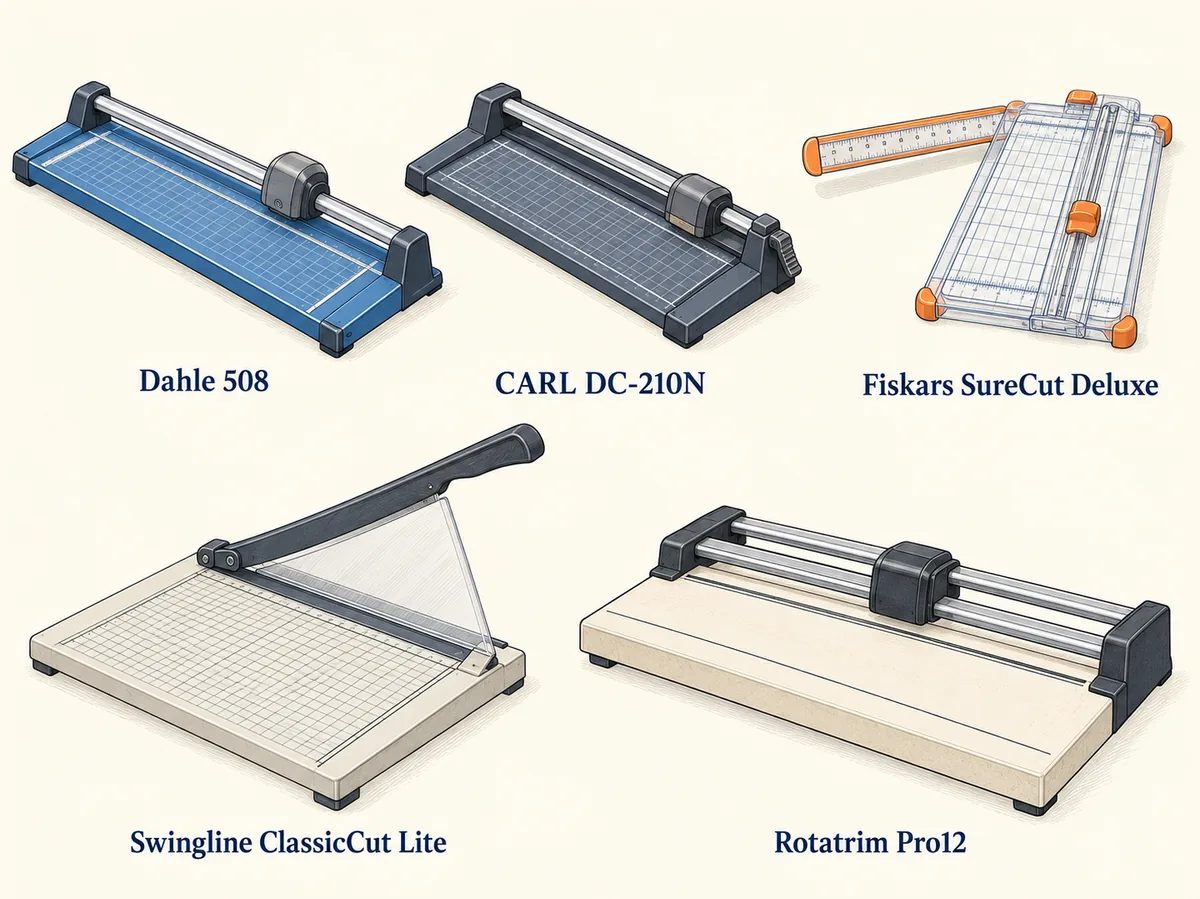
A crooked edge can make a good print look rushed. The right paper cutter helps, but a bigger machine is not always the answer. The paper you cut, the length of the edge and the size of the batch should lead the choice.
I would start with a modest rotary paper trimmer for art prints and cards. For larger stacks of paper, I would look at a stronger clamp and a clear sheet capacity. Those details matter more than a bold "heavy duty" label.
Five cutters and trimmers at a glance
| Paper cutter | Best reason to choose it |
|---|---|
| Dahle 508 | 18-inch cutting length for single sheets and small batches |
| CARL DC-210N | 12-inch cutting length and a locking rail for paper stacks |
| Fiskars SureCut Deluxe 12-inch | A visible cut line for cards and small craft projects |
| Swingline ClassicCut Lite 12-inch | Quick guillotine cuts through short batches |
| Rotatrim Pro12 | A solid base and twin rails for regular studio work |
1. Dahle 508: my pick for prints and card blanks
The Dahle 508 combines an 18-inch cutting length with an enclosed rotary blade. I would choose it for trimming prints, loose art sheets and small batches where a controlled cut matters more than speed.
The US model is rated for five sheets of paper. That modest cutting capacity is a useful reminder: this is a trimmer, not a machine for a thick pile. Its automatic clamp helps hold the sheet as the blade moves along the rail.
I like the extra cutting length for bigger paper. A 12-inch cutter can feel cramped when you need to trim the long side of a larger sheet. Check the space on your desk, though. The 508's base takes more room than a small craft trimmer.
Best for: single prints and small batches. Main drawback: the five-sheet capacity will feel slow if your normal job is a large stack.
2. CARL DC-210N: for a clamped paper stack
The CARL DC-210N is the paper cutter I would consider for repeat batches. It has a 12-inch cut, a steel base and a locking rail. CARL rates it for up to 36 sheets of 20 lb paper.
The paper weight in that rating matters. Thirty-six sheets of thin office paper are not the same job as thirty-six sheets of card. Use the maker's directions for the material, stack size and number of passes.
Its replaceable cutting mat and blade make it useful for regular work, but they add to the cost. Check the exact replacement blade and mat codes before buying. A sturdy paper trimmer is less useful if the parts you need are hard to find.
I would choose this over a light craft cutter when small stacks are a routine part of the week. I would not buy it just to trim two greeting cards each month.
Best for: repeated paper batches. Main drawback: its headline sheet capacity does not apply to thick card or every craft material.
3. Fiskars SureCut Deluxe: for small craft paper jobs
The Fiskars SureCut Deluxe 12-inch uses a small sliding blade and a wire that shows the cut line. I would choose it for cards, photos and small craft projects where seeing that line helps place the edge.
It has a swing-out measuring arm and a light design. Those features suit a shared table that needs to be cleared after a session. The tradeoff is the small blade: it is a part you should expect to replace as it wears.
This is the cutter I would consider for occasional use and easy storage. I would look elsewhere for large stacks of paper or daily print work. The low weight that helps you carry it does not give the same planted feel as a heavy studio base.
Check that the replacement blade fits the exact model. Fiskars uses different blade families across its paper cutters. A near-match in a store photo is not enough.
Best for: occasional cards and craft work. Main drawback: blade wear and a light build make it less suited to long cutting sessions.
4. Swingline ClassicCut Lite: for quick guillotine cuts
The Swingline ClassicCut Lite 12-inch is a guillotine cutter with a ten-sheet rating for 20 lb paper. A pivoting arm brings the blade down through the sheet. That can make short, repeated cutting jobs feel direct.
It has a guard rail and a blade latch. Keep the guard in place, and latch the arm when the cutter is stored. A guillotine paper cutter asks for more care around the blade than an enclosed rotary head.
In a longstanding owner review at Cool Tools, Chris Hartmann found this cutter useful for small batches of card. His result is not a new cutting-capacity rating. I would still follow the current manual and reduce the stack for heavier paper.
Best for: short batches at a fixed work table. Main drawback: the exposed cutting arm needs careful handling and secure storage.
5. Rotatrim Pro12: for a cutter that lives on the desk
The Rotatrim Pro12 has a 12-inch cut, twin guide rails and a solid laminate base. At 5.2 kg, it is the model I would choose to leave in place for regular studio work.
The current maker's page gives a cutting capacity of up to 3 mm for suitable flexible materials. That is a thickness limit, not a promise for every stack or rigid board. Match the exact material to the maker's guidance before cutting it.
The twin rails guide the head, while a clear clamp strip helps position the work. I like those features for repeated, careful trimming. The weight is the tradeoff. This is not the paper cutter I would pack for a casual craft night.
Best for: a dedicated studio cutting station. Main drawback: the weight and base size make storage and travel less convenient.
Rotary trimmers or guillotine paper cutters?
Rotary paper trimmers move a round blade along a rail. Many keep the blade inside a head. I prefer that style for measured cuts on a few sheets at a time. The clamp, rail and paper stop are still key to a straight edge.
Guillotine paper cutters swing a blade down on one side. They can suit quick repeated cuts and small paper stacks. A safety guard and blade lock matter, as does keeping your fingers clear of the cutting path.
Small sliding-blade craft trimmers use another approach: a short blade runs along a track. They are light and easy to put away. They also depend on a sharp, correctly fitted blade.
A manual paper cutter for a home studio is different from an industrial paper cutting machine. Stack cutters built for thick piles may use a large clamp, a stronger frame and more complex guards. None of the light craft choices here should be treated as an industrial stack cutter.
When are automatic paper cutters worth considering?
A manual paper cutter suits a small workload and lets you control each cut. An automatic paper cutting machine makes more sense when cutting large stacks is a daily job. Some commercial cutters store up to 99 cut programs. Repeat settings can save setup time. They also bring a much higher price and more care requirements.
For a home studio, I would compare the price of an occasional print-shop job with the cost of a larger machine. Industrial stack cutters take space, and their guards and clamps need proper use. Extra capacity is useful only if you need it.
Check cutting length before sheet capacity
Measure the longest edge you need to cut. A paper cutter with a 12-inch cutting length can handle many card and letter-paper jobs. It cannot make one full cut along a 17-inch edge.
Then check cutting capacity. Makers often rate sheet capacity using ordinary 20 lb office paper. Cardstock, textured art paper and laminated sheets can be thicker or harder to cut. A ten-sheet label does not mean ten sheets of everything.
I would leave some spare capacity for regular work. If every cut sits at the tool's limit, a small change in paper can make the job awkward. Fewer sheets per pass may also help stop a stack from creeping.
Check the width of the base too
Cutting length tells you how far the blade travels. Base width tells you how much of the sheet has support. A narrow portable cutter can work for cards, yet feel awkward with large photos or scrapbook sheets.
Look at the side ruler, paper guides and measuring arm. Can you read the marks with the sheet in place? Does the arm give enough support at the width you need? These small features can matter more for precise cutting than a long sheet-capacity claim.
A clean cut starts before the blade moves
Square the sheet against the guide. Check the printed side as well as the paper edge. A print can be slightly crooked on a square sheet, so cutting only by the outer edge may leave an uneven border.
Hold or clamp the paper as the manual directs. Keep the base flat on a firm table. Non-slip feet help, but they cannot fix a wobbly desk. Support large sheets so they do not pull away from the fence.
For accurate cutting, make one trial cut on an offcut from the same stock. Check it with a square before working through a pile. That small pause can save a whole batch of card blanks.
My gouache guide covers paper choices for painted cards. My POSCA guide explains why a spare strip of the same paper is useful for testing paint flow.
Do not ask a paper trimmer to be a board cutter
Mat board, foam board, vinyl, labels and dense cover stock need their own checks. Being thin enough to fit under a clamp does not make a material suitable for the blade.
Use the exact model's approved material list. Never force a cut, remove a guard or increase pressure to make up for a dull blade. If the tool starts tearing or pushing the paper, stop and check its setup and wear parts.
Keep the manual where you can find it. The Rotatrim manual library is a useful example of the care information to look for before buying a cutter. A clear parts list matters just as much as the first clean cut.
Safety features and upkeep are part of the price
Check the blade guard, clamp, storage lock and build quality before buying. Guillotine trimmers need a secure arm and a clear guard. Rotary trimmers should keep the blade enclosed as designed. Non-slip feet help the base stay still while you cut.
Keep fingers out of the cutting path, even when the tool feels small. Use the clamp as directed when cutting multiple sheets. Guards are safety features, not a reason to rush. A cutter should rest flat and stay out of reach when it is not in use.
Paper dust, a worn mat or a dull blade can spoil accurate cutting. Follow the manual for cleaning and blade changes. Do not wipe a sharp edge with bare fingers or add oil unless the maker calls for it. Stop when the paper starts to tear.
I would compare the purchase price with the price of spare blades and mats. A lightweight trimmer with easy-to-find parts may suit occasional scrapbooking. For frequent work, a more durable base and firm clamp may justify spending more. The best paper cutter is the one whose capacity, upkeep and storage fit your week.
My buying choice
For most home art studios, I would choose the Dahle 508. Its longer cut and enclosed blade suit varied sheets without turning the desk into a print shop. For thicker paper batches, I would look at the CARL DC-210N and check its rating against the stock.
Choose the Fiskars for easy storage, the Swingline for a simple guillotine action, or the Rotatrim for a fixed studio station. Buy for the work you do each week. A cutter earns its space by making that work easier.